Why Most AI Pilots Fail After the Demo
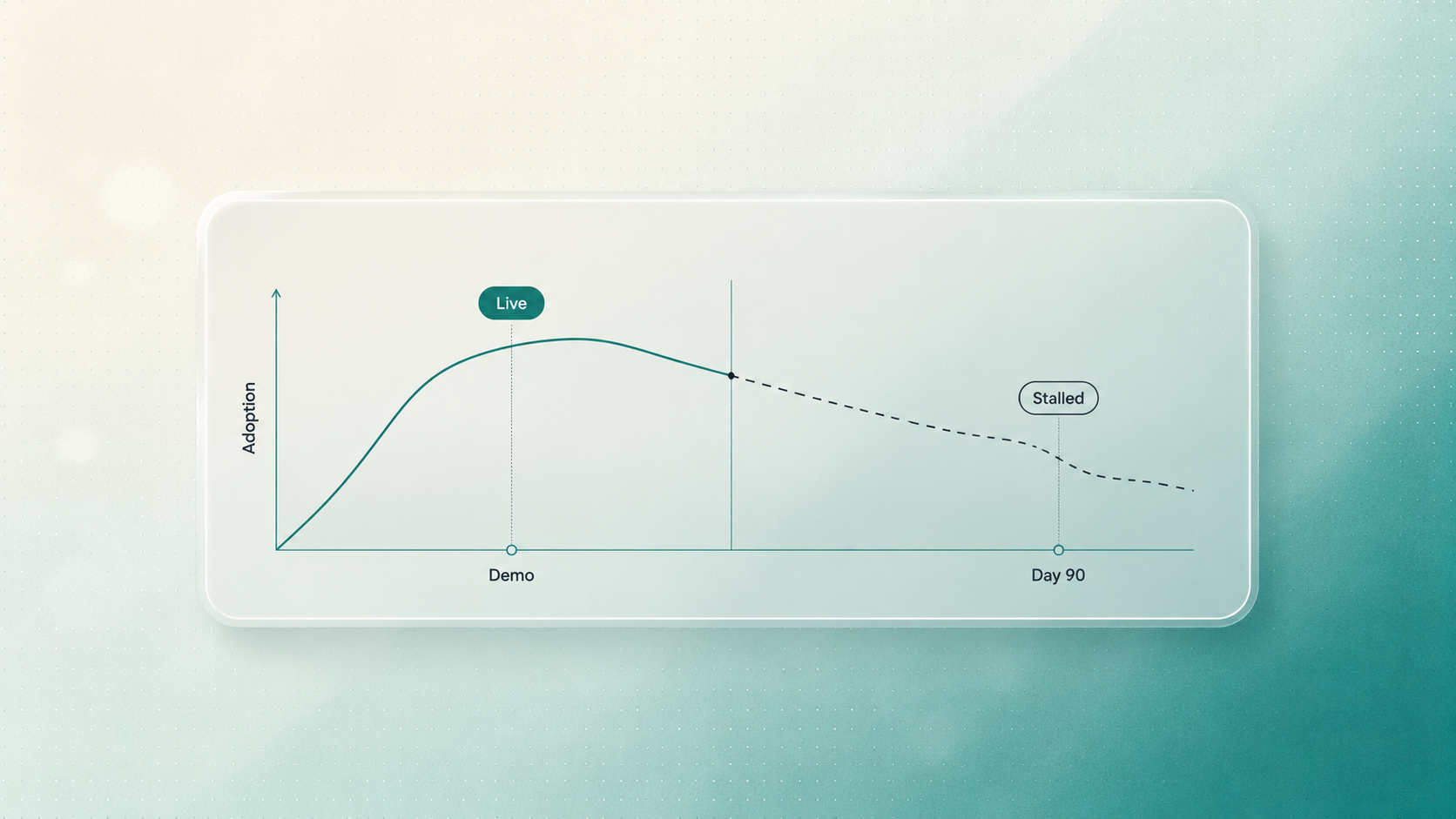
Every AI pilot has its best day in the demo room.
The data is clean. The workflow is narrow. The prompts have been tested. The user interface looks polished. The executive team watches the system summarize, classify, generate, or recommend with just enough speed to feel impressive.
Then the pilot goes live.
For a few weeks, the team is curious. People try the new tool, share reactions, and tolerate the extra steps because the novelty is still doing some of the adoption work.
By month three, the truth appears. The tool is still technically available, but the team has stopped relying on it. The old manual process returns. The pilot becomes a browser bookmark, a slide in a board update, or a quiet lesson the company does not want to repeat.
Most AI pilots fail after the demo because they are built for presentation conditions, not operating conditions. They ignore workflow friction, messy data, edge cases, permissions, human review, and post-launch refinement. To survive day 90, an AI pilot needs software boundaries, adoption design, and a feedback loop around real work.
The issue is usually not that the AI model is too weak. The issue is that the implementation was too thin.
A Demo Is Not a Production System
A demo is like a showroom apartment. It is useful because it helps people imagine what is possible. But nobody should confuse it with a finished building.
A production system needs foundations, wiring, plumbing, access points, safety checks, and maintenance plans. AI is the same. The model may be the most visible part, but the value depends on everything around it: data handling, workflow design, exception management, user experience, permissions, monitoring, and human oversight.
Most failed pilots skip that infrastructure because the demo does not expose the problem.
During a presentation, nobody notices that the user had to paste data from three systems. Nobody asks what happens when the spreadsheet has missing fields. Nobody tests whether the sales team will trust the output during a live renewal call. Nobody measures whether the AI saves time after the third week, when curiosity has worn off.
Month three exposes what the demo hides.
The First Failure Mode: Workflow Friction
The most common AI adoption problem is not dramatic. It is small, repeated friction.
Many pilots are built as standalone destinations. The employee has to leave the system they already use, open a separate tool, paste information into it, wait for a response, check the output, copy the result back, and then continue the original task.
In a demo, that feels manageable. In a real workday, it becomes expensive.
For example:
- A salesperson will not leave the CRM every time they need a lead summary if the manual version is faster.
- An account manager will not use an AI reporting assistant if they still have to clean the data before and after every run.
- A delivery lead will not trust a project-risk assistant if it creates another inbox to monitor.
- A support team will not adopt a triage tool if urgent exceptions still require manual hunting.
If using the AI system adds more cognitive load than the old process, people will abandon it. They may not formally reject it. They will simply protect their time.
That is why AI implementation has to be designed around the workflow, not around the demo interface.
The Second Failure Mode: The Edge-Case Avalanche
The second failure mode arrives when real data enters the system.
Demo data is usually clean. Live data rarely is. It includes partial forms, inconsistent naming, unexpected file formats, duplicate records, unclear customer language, missing dates, outdated fields, and human shortcuts that only make sense to the team that created them.
This is where a raw AI prototype starts to wobble.
When the system receives an input it was not designed to handle, one of three things often happens:
- It freezes and forces the user back to manual work.
- It produces a low-confidence answer with no clear escalation path.
- It confidently generates an output that looks plausible but is wrong.
The third outcome is the most dangerous because it damages trust. Once the team sees AI create a client-facing error, mishandle a record, or misread an important exception, they start checking everything manually. At that point, the system no longer saves time. It creates review burden.
This is why edge cases are not a minor technical detail. They are adoption risks.
The Third Failure Mode: No Owner After Launch
Many pilots are treated as finished the moment they go live.
That is a mistake. The first launch is when the real learning begins. Users behave differently than expected. Inputs arrive in unexpected formats. Managers ask for different controls. Teams discover where the system helps and where it interrupts.
If no one is responsible for observing usage and improving the workflow, the pilot drifts.
The signs are easy to miss:
- Usage drops after the first few weeks.
- Employees use the system only for low-stakes tasks.
- Managers still ask for manual checks before trusting outputs.
- Edge cases pile up with no clear process for handling them.
- The team starts saying, "It works, but it does not really fit how we work."
That last sentence is the death sentence for many AI pilots.
A Day-90 Checklist for AI Pilot Risk
Before scaling an AI pilot, ask these questions:
- Does the system live inside the workflow, or does it require people to leave their normal tools?
- What manual steps still happen before and after the AI output?
- What happens when the input data is incomplete, messy, or contradictory?
- Which decisions require human approval?
- Can the system explain when confidence is low or when escalation is needed?
- Who monitors real usage after launch?
- What metric will show whether the pilot is becoming part of daily work?
- What is the plan for improving the system during the first 30, 60, and 90 days?
If the answers are unclear, the pilot may still be useful as a prototype. It is not ready to be treated as an operational system.
How to Build an AI Pilot That Survives Month Three
At WhatanAidea, we judge AI projects by what happens after the launch excitement fades.
The goal is not to create a demo that wins applause. The goal is to build a system that a team trusts on a normal Tuesday, with normal data, under normal pressure.
That requires three design principles.
1. Build Software Boundaries Around the Model
We do not treat the AI model as the whole system. We wrap it inside software that controls inputs, routes outputs, handles exceptions, and gives humans the right checkpoints.
This may include:
- Input validation before the model runs
- Data cleanup and formatting rules
- Confidence thresholds
- Human-in-the-loop approvals
- Audit logs
- Escalation paths for unusual cases
- Integration with the tools the team already uses
These boundaries reduce risk because the system knows what to do when reality gets messy.
2. Design for the User's Actual Workday
AI adoption improves when the system removes effort instead of adding a new ritual.
That means the implementation should consider where the user already works, what information they already have, what decisions they need to make, and how much review burden they can tolerate.
Sometimes the best AI interface is not a new dashboard. It may be a CRM workflow, an automated email draft, a Slack approval step, a project management update, or a report that arrives already prepared for review.
The system should meet the workflow where it is.
3. Stay With the System After Launch
The first version is not the finish line. It is the first real test.
After launch, the implementation team should watch how real users interact with the system, where they hesitate, which outputs they edit, which exceptions recur, and where the AI creates genuine time savings.
That feedback loop turns a fragile pilot into a durable operational system.
What to Measure Before You Call the Pilot Successful
Do not measure an AI pilot only by demo quality or launch date. Measure whether it is changing the work.
Useful signals include:
- Weekly active usage by the intended team
- Reduction in manual handoffs or repeated copy-paste steps
- Number of exceptions handled safely
- Time from input to completed output
- Manager review burden
- User trust in the output
- Quality of the final business result
You do not need a complicated ROI model to start. A simple operating-cost estimate can be enough:
Weekly cost = hours spent per week x hourly cost of the people involved
Monthly cost = weekly cost x 4.3
Opportunity cost = time spent on repetitive work that could be used for sales, delivery, strategy, or client work
If the pilot cannot connect to time, quality, speed, risk reduction, or revenue support, it may be an interesting experiment rather than a business system.
We Do Not Build AI Pilots for the Demo Room
The companies that get real value from AI will be the ones that build for the conditions their teams actually face: messy inputs, busy users, unclear exceptions, approval needs, and changing workflows.
That does not mean every AI project has to be large. In fact, the best first projects are often narrow. But they need to be built with production discipline from the beginning.
At WhatanAidea, we help teams move from impressive prototypes to useful systems. We design the workflow, build the software harness, add the right human review points, and improve the system after launch so it has a real chance of surviving month three.
If you already have an AI pilot that looks good in a demo but is not becoming part of daily work, do not write it off yet. The idea may still be sound. The implementation may simply need stronger boundaries, better workflow fit, and a clearer adoption plan.
Want to know whether your AI pilot is ready for day 90? Book an AI pilot risk review. We will examine the workflow, identify friction and edge-case risks, and map the changes needed to turn the prototype into something your team can trust.
FAQ
Why do AI pilots fail after the demo?
AI pilots fail after the demo when they are built for controlled presentation conditions instead of real workflow conditions. Common causes include standalone interfaces, messy live data, unclear approval rules, weak error handling, and no post-launch owner responsible for adoption and refinement.
How can a company reduce AI implementation risk?
Reduce risk by starting with a specific workflow, validating the data inputs, defining human review points, integrating with existing tools, and monitoring usage after launch. The system should be tested against real edge cases before it is treated as production-ready.
What should we automate first with AI?
Start with a repeated, rules-driven workflow where manual effort is visible and the business impact is easy to understand. Good candidates often include lead intake, reporting, proposal preparation, support triage, internal research, and document processing.
Supporting Links
- McKinsey, The State of AI: Global Survey 2025: https://www.mckinsey.com/capabilities/quantumblack/our-insights/the-state-of-ai
- McKinsey, The State of AI: How Organizations Are Rewiring to Capture Value: https://www.mckinsey.com/capabilities/quantumblack/our-insights/the-state-of-ai-how-organizations-are-rewiring-to-capture-value
- NIST, Artificial Intelligence Risk Management Framework 1.0: https://www.nist.gov/publications/artificial-intelligence-risk-management-framework-ai-rmf-10
- Stanford HAI, AI Index Report 2026, Economy chapter: https://hai.stanford.edu/assets/files/ai_index_report_2026_chapter_4_economy.pdf
Written by

WhatanAIdea is an outcome-first AI consultancy. We go deep into your business first, then show where AI fits, where it doesn’t, and what is worth doing first.